Studio 1 Web Design
Visit our partner site where we offer logo
design, Los Angeles web design and
search engine optimization services.
  Web Design   Web Hosting   Photoshop Tutorials   Free Fonts   Featured Clients   Book Store  
 
Photoshop Tutorials - Free Fonts
[Home]
[Store]
[Search]
[Sitemap]
[Newest Pages]
[Read Me First!]
[Photoshop Tutorials]
[Canvas Tutorials]
[Corel Tutorials]
[Quark Tutorials]
[Illustrator Tutorials]
[FreeHand Tutorials]
[Drawing Basics]
[Porting Files]
[Free Fonts]
[Font Tutorials]
[Misc Tutorials]
[Animation]
[About Mike]
[Guestbook]
[Gallery]
[Related Sites]
[Resource Directory]
[Add Your URL]
[Downloads]

 
California Home Loans
Hard Money Lenders
Laser Hair Removal
Mailing Lists
Mesotherapy
Private Money Loan
 
    Intermediate  
 
  FreeHand® Cool Metallic Gradients
Part 4
  Buy FreeHand Software!
Books on FreeHand
FreeHand Training CDs

12. Drop the new color chip over the top color well (circled below right). When you release the mouse button, the selected object and the Fill inspector will reflect the change to the gradient.
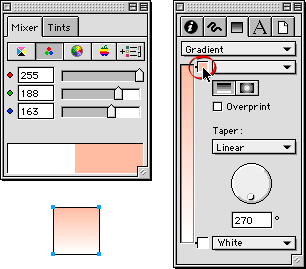
13. Next, create the second color. Enter, 255, 160 and 124 in the R, G and B boxes, respectively (below left). Again, use the Eyedropper tool to drag and drop a color chip just below the top color well in the Fill inspector.
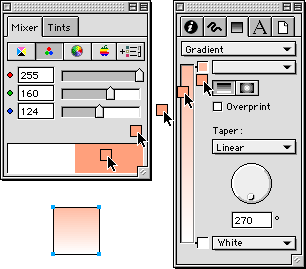
14. When you release the mouse button a second color well will be created and the changes will be reflected in the selected object and the Fill inspector.
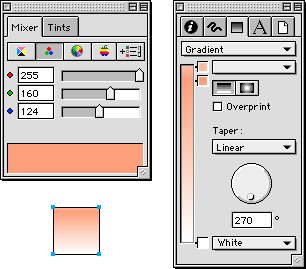
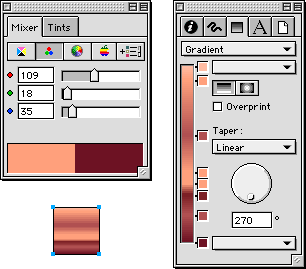
15. Continue adding colors one by one in the previous manner until all the colors have been added to the gradient. The finished result is shown in the selected object below.
Examples: Click any thumbnail image below for a lager view

 
  Previous   Home    Contact Mike   Related Sites    Next Copyright © 1998 - 2007 Mike Doughty, All Rights Reserved Legal Notices
Page Last Revised: October 14, 2007
Privacy Policy


Hard money lenders can arrange a private money loan or hard money loans with fast approval!