|
|
Font
Basics - Part 3A
Font Utilities: Font Managers
|
 |
|
|
|
|
|
|
There are several useful font utilities
for Macintosh® and Windows® platforms. Most
basic of these is a font manager for Type 1 fonts. Since
Type 1 fonts are not native to either the Maintosh or
Windows 95/98 operating systems, Type 1 fonts won't
be accessible without it. Then there are font browsers
(or viewers) which let you view and print specimen sheets
for both installed and uninstalled fonts. There are
also cross-platform font converters. These are for converting
Mac® fonts to PC fonts and vise-versa. Then there
are the powerful font editing programs like Macromedia®
Fontographer® and FontLab®. These programs allow
you to edit the fonts themselves plus they will convert
Mac® fonts to PC fonts and will convert Type 1 fonts
to TrueType® and vise-versa.
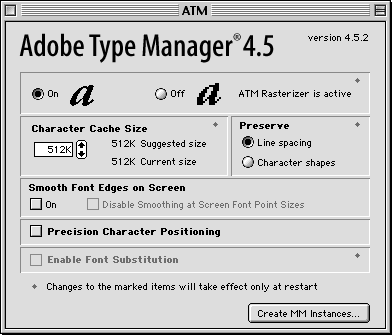
Basic Font Manager:
ATM® Lite (available for Mac or PC
- free from the Adobe® web site: http://www.adobe.com/products/atmlight/main.html).
If you plan to use Type 1 fonts on the
Mac you will need ATM whether or not you install a more
powerful font manager. Shown below is a screen shot
of ATM Lite for the Mac:
Better Font Manager:
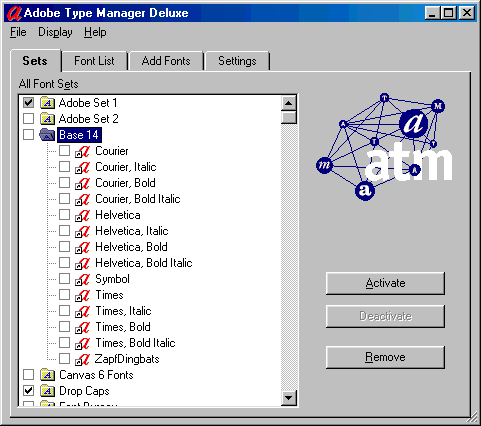
ATM Deluxe (available for both Mac and
PC - http://www.adobe.com).
ATM Deluxe will let you organize fonts
in sets. This is very handy because you can activate
and deactivate them much more easily. It will also search
and find all your fonts and make them available to applications
when they are needed. ATM will auto-activate fonts.
If a document contains references to uninstalled fonts,
ATM will activate them automatically.
More Great Font Managers:
Either Font Reserve (now discontinued, used to be available for both
Mac and PC - http://www.fontreserve.com)
or Extensis® Suitcase™ (for Mac and PC - http://www.extensis.com).
 |
|
Note:
ATM Lite is required on the Mac even if using Font
Reserve or Suitcase. |
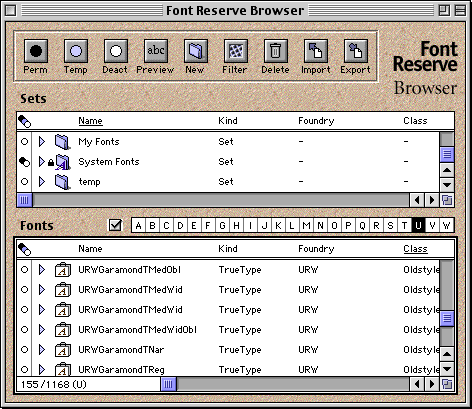
I like Font Reserve, personally. Mac fonts
are easily damaged and Font Reserve stores them safely
in a vault. It also auto-activates them plus it lets
you organize them in sets like ATM Deluxe. It also lets
you sort fonts using a variety of filters and lets you
view fonts and print out specimen sheets. Below is a
screen shot of Font Reserve.
Click
Here To Continue...
|

