|
|
| |
|
|
 |
| |
| |
|
Intermediate |
|
| |
|
|
Porting
Fonts Across Platforms:
Number 9B |
 |
|
|
|
|
|
|
Porting PC TrueType® Fonts To
The Mac® With Mac TransType
Click here
for more on working with TransType
Click here
for legal note on fictitious font name used in this
tutorial
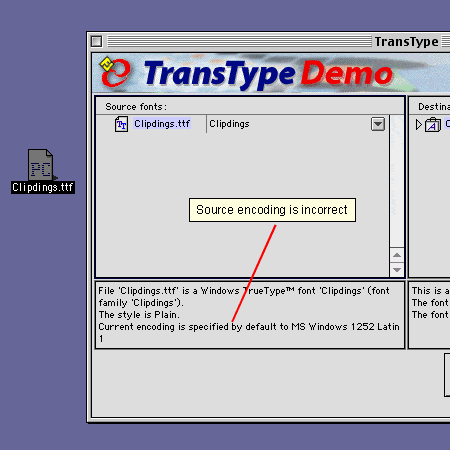
4. The input specifications in the legend
panel on the left indicate that TransType wants to use
the default encoding (MS Windows® 1252 Latin 1).
The default encoding is specified in the preferences
(more
here on setting up TransType preferences). In this
case the default encoding is incorrect. Clipdings is
a symbol font so we want to use "MS Windows Symbol"
encoding. More here
on TransType's font input and output specifications.
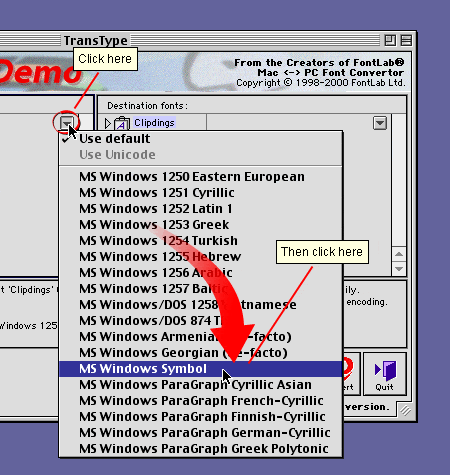
5. Click the drop-down arrow to the right
of the font in the source list to change the the source
encoding (circled below). Select "MS Windows Symbol"
from the popup menu. You always want to make sure the
encoding is accounted for. Leave nothing to chance.
Click
Here To Continue...
|
|
|
|
|
| |
Previous
Home
Contact Mike
Related Sites
Next
Copyright
© 1998-2016 Mike Doughty, All Rights Reserved Legal
Notices
Page Last Revised: October 26, 2016
Privacy Policy
|
|
|
|
|
|
|
|
