|
|
| |
|
|
 |
| |
| |
|
Advanced |
|
| |
|
|
The
Equivalence of Masks and Clipping Paths |
 |
|
|
|
|
|
|
Masks in Illustration Programs...Clipping Paths
in Image Editors
A bitmap image
with a clipping path prepared in an image editor
(Adobe® Photoshop®
or Corel PHOTO-PAINT®) is
functionally equivalent to a bitmap
image with a mask prepared in an illustration program
(Deneba Canvas™, Adobe Illustrator®,
Macromedia® FreeHand®
or CorelDRAW®). In order for
the image with the clipping path or mask to be utilized
in any document, whether it be for a page layout program
(QuarkXPress™ or Adobe PageMaker®),
an image editor or illustration program, the image should
be exported as an EPS file. The EPS format is the most
widely supported amongst page layout programs for utilizing
images with clipping paths or masks.
 |
|
Note:
Both Adobe InDesign®
and Adobe Illustrator support native Photoshop .PSD
files with clipping paths. Although Illustrator
isn't usually used for page layout, nevertheless
it can be used for simple one-page layouts destined
for print. Still, EPS is the most universal format
for images with clipping paths. |
Because an image with a clipping path contains both
vector data (the clipping path) and bitmap data (the
image itself) the file format has to support both data
types. The EPS file format uses PostScript®
and supports both data types in a single file. This
is why it is the most universal format for this purpose.
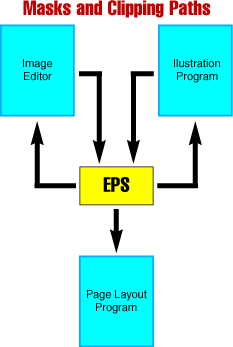
The chart below describes the various routes such EPS
files can follow:
|
|
Note:
The generic EPS format is the best for porting straight
line art drawings. Porting masked bitmaps using
the PDF format is covered more fully in another
page(port4.htm).
Still, there is no single format which ports reliably
in all situations. Much of this has to be done by
trial and error. |
The exporting of EPS files as masked bitmaps from an
illustration program is not the usual output
channel for such images. Graphic artists and service
bureaus are used to these files being prepared with
an image editor. Nevertheless, if you were to embed
or link a bitmap into an illustration program (such
as Adobe Illustrator), then knock it out with a mask
and export the image and mask as an EPS file it would
work the same as if it were prepared in an image editor
(such as Adobe Photoshop) with a clipping path.
Click
Here To Continue...
|
|
|
|
|
| |
Previous
Home
Contact Mike
Related Sites
Next
Copyright
© 1998-2016 Mike Doughty, All Rights Reserved Legal
Notices
Page Last Revised: October 26, 2016
Privacy Policy
|
|
|
|
|
|
|
|
