|
|
| |
|
|
 |
| |
| |
|
Intermediate |
|
| |
|
|
Wha's
UUUp! Type Effect With Canvas™ 7
Part Two |
 |
|
|
|
|
|
|
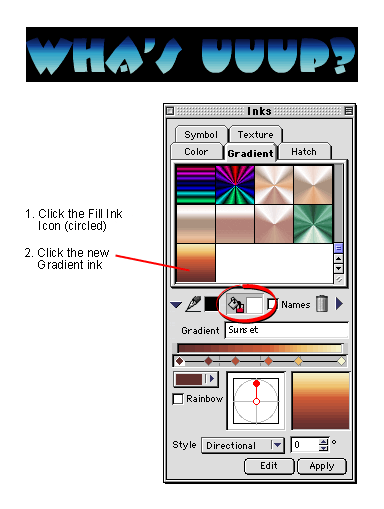
8. Next click the Fill icon (circled, below), then
click the new gradient ink saved in the previous step.
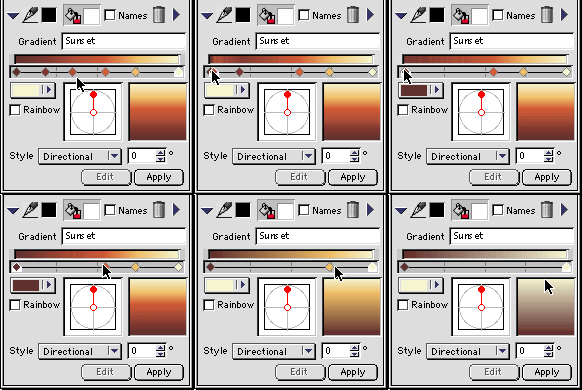
9. We need to make a new gradient ink for the stroke
color. If you are continuing without restarting Canvas,
the gradient from the previous step will appear in preview
box and color bar. The new gradient will have only one
starting and ending color each. The color bar has pointers
for the starting and ending colors. To get rid of the
intermediate colors, simply drag them to either end
of the color bar (below).
Click
Here To Continue...
|
|
|
|
|
| |
Previous
Home
Contact Mike
Related Sites
Next
Copyright
© 1998-2016 Mike Doughty, All Rights Reserved Legal
Notices
Page Last Revised: October 26, 2016
Privacy Policy
|
|
|
|
|
|
|
|
