|
|
| |
|
|
 |
| |
| |
|
Intermediate |
|
| |
|
|
Cool
Traveling Lens Effect In Canvas™ 7
Part Five |
 |
|
|
|
|
|
|
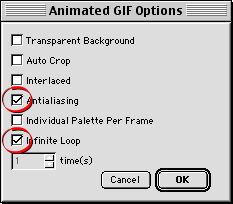
28. You will see a dialog where you can
select animated GIF options. Choose "Infinite Loop"
and "Antialiasing" (circled below). This will
cause the animation to loop forever, and the text will
have a smooth, anti-aliased appearance.
29. Shown below is the finished effect.
This tutorial just used a simple lens.
Shown below is an image of a Canvas 7 clip I created
that you can use to create a more elaborate version
of the animation. Click
here for a sample animation using the magnifying glass
(190k).
Try doing the tutorial similar to the
image below using the magnifying glass instead of the
simple lens. Have fun! Canvas is a blast!

|
|
|
|
|
| |
Previous
Home
Contact Mike
Related Sites
Next
Copyright
© 1998-2016 Mike Doughty, All Rights Reserved Legal
Notices
Page Last Revised: October 26, 2016
Privacy Policy
|
|
|
|
|
|
|
|