|
|
| |
|
|
 |
| |
| |
|
Advanced |
|
| |
|
|
PostScript®
Printing Without a Printer- Windows® 98 - Part
Three |
 |
|
|
|
|
|
|
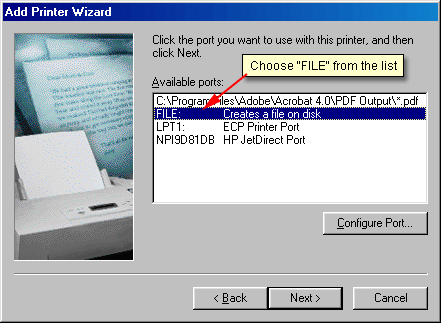
5. The next screen asks you to select a port for the
printer. Select "Use the following port" and
choose "FILE: (Print to file)" from the list.
Then click "Next".
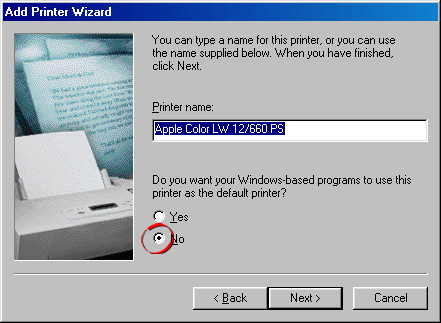
6. The next screen asks you to give the new printer
a name. This will be the name of the printer which will
appear in the Printers folder and in the list of available
printers in your applications. Windows will insert the
printer name into the text box. Choose "No"
for the question "Do you want your Windows-based
programs to use this printer as the default printer?"
then click the "Next" button.
Click
Here To Continue...
|
|
|
|
|
| |
Previous
Home
Contact Mike
Related Sites Next
Copyright
© 1998-2016 Mike Doughty, All Rights Reserved Legal
Notices
Page Last Revised: October 26, 2016
Privacy Policy
|
|
|
|
|
|
|
|
