Studio 1 Web Design
Visit our partner site where we offer logo
design, Los Angeles web design and
search engine optimization services.
  Web Design   Web Hosting   Photoshop Tutorials   Free Fonts   Featured Clients   Book Store  
 
Photoshop Tutorials - Free Fonts
[Home]
[Store]
[Search]
[Sitemap]
[Newest Pages]
[Read Me First!]
[Photoshop Tutorials]
[Canvas Tutorials]
[Corel Tutorials]
[Quark Tutorials]
[Illustrator Tutorials]
[FreeHand Tutorials]
[Drawing Basics]
[Porting Files]
[Free Fonts]
[Font Tutorials]
[Misc Tutorials]
[Animation]
[About Mike]
[Guestbook]
[Gallery]
[Related Sites]
[Resource Directory]
[Add Your URL]
[Downloads]

 
California Home Loans
Hard Money Lenders
Laser Hair Removal
Mailing Lists
Mesotherapy
Private Money Loan
 
    Advanced  
 
  Extracting Clipping Paths From Corel® PHOTO-PAINT® 8   Buy Graphics & DTP Software!
Books on Graphics & DTP
Graphics & DTP Training CDs

Part Two: Load The EPS File Into Illustrator® And Save Path

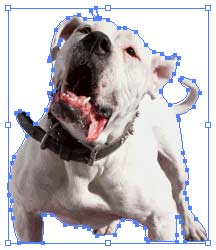
1. Open the previously exported EPS image file into Adobe® Illustrator.

clip26.jpg

2. Using the Selection Tool, drag a marquee around the image.

clip14.jpg

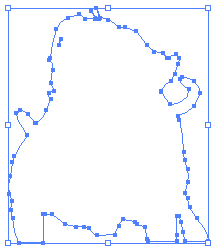
3. Click Object > Ungroup (when the EPS file is created, all objects are grouped). Then select the clipping path with the Selection Tool. Click Edit > Copy to copy the path into memory.

clip27.jpg

4. If you want to port the path to Photoshop® and it is not already loaded, launch it now.

Note: If you only want to port the path to Photoshop and not save the path as a vector file for editing in either Macromedia® FreeHand® or CorelDRAW®, you can skip step 5.

5. Click File > New. Then click Edit > Paste to paste the path by itself in a new vector file. Next click File > Save and choose "Illustrator EPS" as the file type. Then enter a file name of your choice.

clip28.gif

If you are porting the path to Photoshop Click Here To Continue

Otherwise Click Here To Return To "Extracting Clipping Paths" Page

Click Here To Continue...

 
  Previous   Home    Contact Mike   Related Sites    Next Copyright © 1998 - 2007 Mike Doughty, All Rights Reserved Legal Notices
Page Last Revised: October 14, 2007
Privacy Policy


Hard money lenders can arrange a private money loan or hard money loans with fast approval!