|
|
Applying
a Gradient Across Multiple
Objects In FreeHand® |
 |
|
|
|
|
|
|
When applying gradient fills to objects in FreeHand, each object will
have the full range of the gradient applied to it. However, this may not
be the effect you want to create. Sometimes you may want the gradient
fill to be shared across multiple objects. The way to do this is to apply
the gradient to a composite path. The example in this tutorial uses FreeHand
9 on a text object that has been converted to paths.
1. Start by selecting the Text Tool  and click anywhere on the layout area.

2. Type some text. In this example we will type the word, "GRADIENT".
The font is Arial Black.

3. Click Text> Convert To Paths.

4. Bring up the Fill Inspector and the Color Mixer. Setup the gradient
colors in the Color Mixer, then create the gradient in the Fill Inspector.
Notice how each letter has the full gradient applied to it.
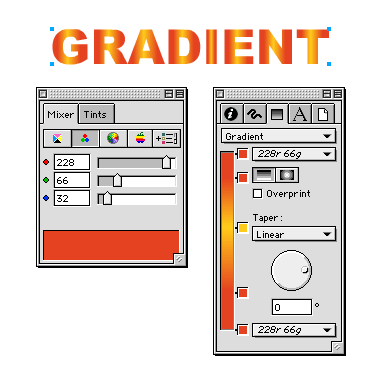
5. While all the objects are still selected, click Modify > Join (this
is the command to create a composite path). Notice that the gradient is
now applied across all the objects instead of each one individually.

Click Here For Doing
This Technique With Deneba Canvas™
Click Here For Doing
This Technique With Adobe® Illustrator®
|

