|
|
Porting
Fonts Across Platforms:
Number 8B |
 |
|
|
|
|
|
|
Porting Mac® Type 1 Fonts To
The PC With PC TransType
Click here
for more on working with TransType
Click here
for legal note on fictitious font name used in this
tutorial
4. Converting Mac Type 1 fonts to the
PC is slightly different than converting PC Type 1 fonts
to the Mac with TransType. When converting PC Type 1
fonts, you can drag and drop the PFB file (the file
containing the font outlines) into the TransType window.
As long as the PFM file (containing the metrics) is
in the same folder, the metrics will be included in
the conversion. However, when converting Mac Type 1
fonts, if you drag and drop the file containing the
font outlines into the TransType window, the metrics
will not be included in the conversion (more
here on how TransType handles Type 1 font metrics).
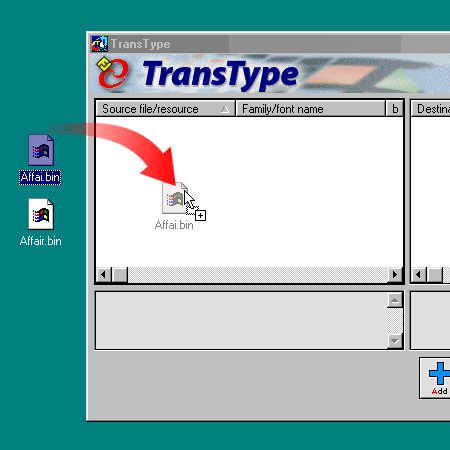
Just to illustrate a point, drag and drop the Mac printer
font into the left side of the TransType window (the
source list). Click here
for more on adding fonts to TransType.
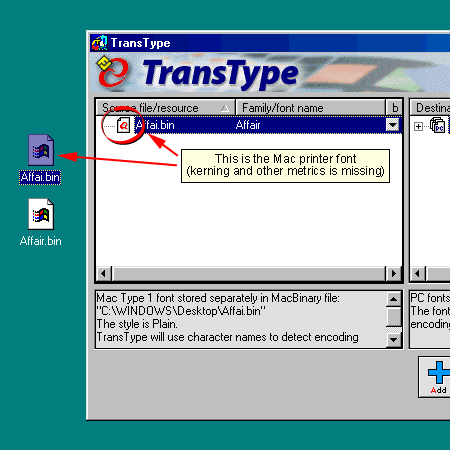
5. You can tell that the wrong file has
been dropped into the window from its small icon (circled
below). You should see an icon that looks like a Mac
suitcase. TransType will function normally, though,
and will convert the font without the metrics. If you
aren't careful, you will miss this point (more
here on why this is important and why you have to take
the necessary steps to include the metrics in the conversion).
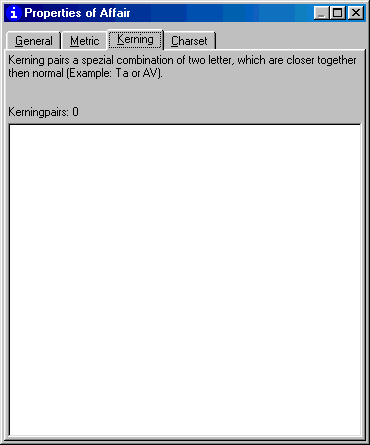
6. At this point I converted the font,
then checked for the kerning information in Typograf
(more
details on Typograf here). As you can see, the "Kerning"
tab of the font properties is totally blank. That means
the kerning information was not included in the conversion.
 |
|
Tip: When in doubt you
can check your results after converting a font as
I did here. If the kerning metrics are missing,
you can always convert the font again and make sure
to include them. |
Click
Here To Continue...
|

